AC12G [V1, V2, V3] | AC1300 Wireless Dual Band Gigabit Router


- AC1300 Dual Band WiFi – Speeds of up to 400 Mbps on the 2.4 GHz band and 867 Mbps on the 5 GHz band
- Full Gigabit Ports — Lightning-fast connections for wired devices, including game consoles, PCs, smart TVs, and more
- Far-Reaching Coverage – 4× high-gain antennas with Beamforming boost stable connections throughout your home for strong WiFi signals in every corner
- Higher Network Efficiency – MU-MIMO technology allows AC12G to communicate with multiple devices at the same time, increasing the overall network throughput
- Smart Connect– Intelligently chooses the best available band for each device
- IPTV and IPv6 supported
-
watch video: Set up your MERCUSYS Wi-Fi Router via a Web Browser-AC12G
Set up your MERCUSYS Wi-Fi Router via a Web Browser-AC12G
Live Your Digital Life at Warp Speed
AC1300 Wireless Dual Band Gigabit Router
AC12G
867Mbps 5GHz
400Mbps2.4GHz
1300 Mbps Wi-Fi for endless home entertainment
Internet entertainments arrive at a warp speed with the powerful AC1300 dual band Wi-Fi. For multiple streaming simultaneous, 400 Mbps over the 2.4 GHz band is great for streaming music and shopping online, while 867 Mbps over the 5 GHz band covers bandwidth-intensive tasks like HD streaming and gaming.
Gigabit Speed for Lightning-Fast Surfing
Lightning-fast wired connections are delivered by four built-in gigabit Ethernet ports. Enjoy lag-free gaming, smooth HD video streaming, and high-speed file downloading.
Reliably Connect up to 60 Devices, Simultaneously
Easily share reliable wireless connection with up to 60 wireless devices, such as phones, tablets, and smart home devices, at the same time. Perfectly cover all network needs whether there is a party in the house or a barbecue in the yard.
Strong Signal,Great Coverage
Four external 5 dBi antennas provide users with broader wireless coverage and wireless signal intensity capable of extending throughout your large home or office. Make weak, dropped connections a thing of the past.
Ready for Smooth IPTV
IGMP Proxy/Snooping, Bridge, and Tag VLAN technology allow streaming to transfer through certain gigabit LAN ports, optimizing Hi-Resolution video.

Advanced Security
WPA3 encryption creates an active defense against security threats and intruders

2×2 MIMO
Increases wireless transmission efficiency between multiple devices

Guest Network
Keep your main network secure with a separate network for guests
*Maximum wireless signal rates are the physical rates derived from IEEE Standard 802.11 specifications. Actual wireless data throughput and wireless coverage are not guaranteed and will vary as a result of 1) environmental factors, including building materials, physical objects, and obstacles, 2) network conditions, including local interference, volume and density of traffic, product location, network complexity, and network overhead, and 3) client limitations, including rated performance, location, connection, quality, and client condition.
MERCUSYS
The MERCUSYS app provides the easiest way for you to set up in minutes and manage your WiFi at home or away through your iOS or Android devices.


MERCUSYS Helps You Set Up in A Few Steps
Without any technical know-how or reading complicated instructions, simply follow the in-app instructions. Set up your mesh network in minutes.
-
 Halo Power Cable Ethernet Cable
Step 1
Find what you’ll need in the box
-

Step 2
Plug in your devices
-

Step 3
Follow the on-screen directions with the MERCUSYS app
Manage Your WiFi in Real Time
With the MERCUSYS app, experience live network management. See who’s connecting to your network and manage it at any time with your iOS or Android devices.
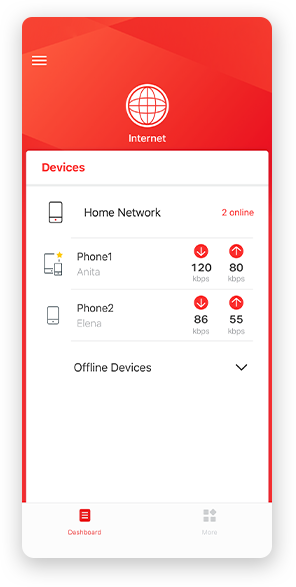
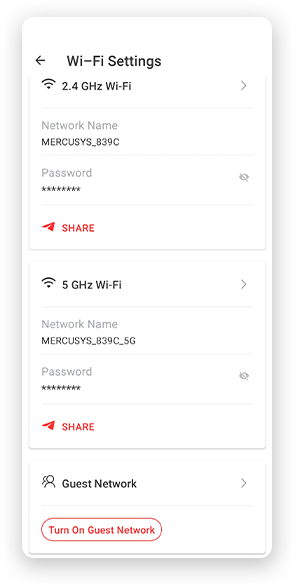
Notice: The configuration page of different models may be different, please refer to the actual one.
Powerful Parental Controls
Easily manage your kids’ online time and content to create a safe and healthy online environment.
-
Create User Profiles
Create a profile for each family member you would like to manage. Assign devices to the profile to set access controls and time limits for them.
-
Online Time Limits
Set daily limits on how long your kids spend online and prevent them from accessing the internet on their devices for a long time to build a healthy network habit.
-
Block Inappropriate Websites
Control which sites your kids visit by setting a block list.
-
Pause Internet Connection
Suspend family members’ internet connections to take a break from the virtual world to enjoy some family time.
Manage and Secure Your Home Network
The MERCUSYS app helps you manage your WiFi at home or away through your iOS or Android devices.

Check the Status of Connected Devices
Intuitively view the working status of your Halo network and see what is connected. Prioritize or block devices as needed.

Quality of Services
Prioritizes devices you select to perform better.

New Device Access Alert
The MERCUSYS app proactively sends out an alert to inform you when an unfamiliar device is connected. Tap to block the device if it is a security risk.

Set Up a Guest Network
Provides a separate network for guests to ensure your security and privacy.
Everything in One App
Whether you’re looking to control a wide range of MERCUSYS routers, extenders, or Halo mesh systems, find it all on the app.
See what’s compatibleCompatible Products
Note: The device's firmware requires the latest version. Click here to learn how to upgrade your firmware.
Note: Both listed and higher hardware versions of these models are compatible with the MERCUSYS app.
Supporting Multiple Languages
MERCUSYS app supports up to 26 languages, enabling easy network management for users all over the world.
-
English
-
Nederlands
-
Français
-
Deutsch
-
Italiano
-
日本語
-
한국어
-
Português
-
Español
-
繁體中文
-
Русский язык
-
Português Brasil
-
Español
(Latinoamérica) -
Български
-
Українська мова
-
Polski
-
Română
-
Slovenčina
-
ไทย
-
Türkçe
-
Čeština
-
Tiếng Việt
-
Eλληνικά
-
Bahasa Melayu
-
Magyar
-
עברית
-
Wireless

| Wi-Fi Class | AC1300 |
|---|---|
| Wi-Fi (2.4 GHz) | 400Mbps |
| Wi-Fi (5 GHz) | 867Mbps |
| Wireless Standards | 802.11ac/a/b/g/n |
| Max Channel Width | 80MHz |
| Reception Sensitivity | 2.4G: 11g 6M: -97dBm 11g 54M: -80dBm 11n 20M MCS7: -78dBm 11n 40M MCS7: -75dBm 5G: 11a 6M: -96dBm 11a 54M: -77dBm 11ac 20M MCS8: -72dBm 11ac 40M MCS9: -67dBm 11ac 80M MCS9: -63dBm |
| Max Wi-Fi Modulation | 256 QAM |
| Wireless Security | WPA/WPA2/WPA3 |
| Wireless Functions | Guest Network Wireless Schedule Smart Connect WPS AP Isolation Airtime Fairness |
-
Software
| Operation Modes | Router/AP |
|---|---|
| WAN Mode | Dynamic IP Static IP PPPoE PPTP L2TP |
| DHCP | Address Reservation DHCP Client List Server |
| NAT Forwarding | Port Forwarding Port Triggering DMZ UPnP |
| Protocols | IPv4 IPv6 |
| IPTV | IGMP Proxy IGMP Snooping Bridge/Custom Tag VLAN |
| Guest Network | 2.4G Guest Network 5G Guest Network |
| Parental Controls | Profile Settings Time Control Pause the Internet Website Filtering |
| DDNS | MERCUSYS NO-IP DynDNS |
| Easy Mesh | Easymesh Compatible |
| QoS | Time Settings Priority Control |
| Security | SPI Firewall Access Control IP & MAC Binding |
| ISP Feature | CWMP ISP Preset(Agile Config) Superadmin |
| System | Firmware Upgrade Backup and Restore Administration System Log Time & Language Settings Reboot |
| Diagnostics | Ping Traceroute |
| LED Management | LED Control Night Mode |
| Device Management | MERCUSYS APP Webpage |
| Cloud | MERCUSYS ID |
| Language | Czech English Spanish-MX Hungarian Italian Korean Polish Portuguese-BR Romanian Russian Turkish Ukrainian Chinese - Taiwan |
| Advanced Features | Beamforming |
-
Hardware
| Dimensions (W X D X H) | 219.2 × 140.9 × 33.5 mm |
|---|---|
| Interfaces | 1× GE WAN 3× GE LAN |
| Antenna | 2× 5G External Antennas 2× 2.4G External Antennas |
| Button | 1× WPS/Reset Button |
| Power Supply | Input:100~240V, 50/60Hz |
| Retail Package Weight | 670g |
| Installation | Desktop Wall-mount |
| LED | SYS Wi-Fi WAN LAN |
| Retail Package Dimension | 303 × 288× 65mm |
| Units per Carton | 10 |
| Carton Dimension | 600 × 325 × 355mm |
| Product Weight | 295g |
-
Others
| Network Services Enabled by Default | Web Server Manage and configure device through web (HTTP/HTTPS) • Port: 80/443 Protocol: TCP DNS DNS • Port: 53 Protocol: TCP & UDP DHCP Server IP address assignment (DHCP) • Port: 67 Protocol: UDP App management Manage and configure device through app • Port: 20002 Protocol: UDP |
|---|---|
| Package Contents | • AC1300 Wi-Fi 5 Router AC12G • Power Adapter • Quick Installation Guide • RJ45 Ethernet Cable |
| Environment | • Operating Temperature: 0°C~40°C (32°F~104°F) • Operating Humidity: 10%~90% Non-Condensing • Storage Humidity: 5%~90% Non-Condensing |